How to fix the Start PXE over IPv4 error in Windows 10 and 11
This article is published in Vietnamese.
 By Phạm Thanh Long
- Development
- 11/09/2024
- 5 minutes read
- 7,294 Views
How to fix the Start PXE over IPv4 error in Windows 10 and 11
PXE là gì?
PXE hay Preboot Execution Environment được sử dụng để boot máy tính có interface client-server trước khi triển khai image PC. Cả DHCP (Dynamic Host Configuration Protocol) và TFTP (Trivial File Transfer Protocol), đều được sử dụng để thực hiện boot mạng PXE. Thông thường, PXE được bật trên máy tính, nhưng bạn có thể tắt nó từ BIOS (sẽ được thảo luận trong phần sau).
Lỗi Start PXE over IPv4 nghĩa là gì?
Bạn sẽ thấy thông báo lỗi “Start PXE over IPv4 ″ khi máy tính cố gắng boot trên mạng LAN. Máy tính của bạn thực hiện điều này khi nó không khởi động được từ ổ boot. Điều này thường xảy ra do cấu hình BIOS sai.
Cách sửa lỗi Start PXE over IPv4
Lỗi này thường xảy ra do không có các thiết bị khởi động khác như ổ cứng. Vì vậy, ta sẽ đặt nó làm thiết bị khởi động mặc định. Bài viết cũng sẽ đề cập đến các giải pháp khác có thể khắc phục lỗi. Đây là những điều bạn có thể làm để sửa lỗi Start PXE over IPv4 trong Windows 11/10.
1. Vô hiệu hóa Secure Boot và Legacy Support
Vô hiệu hóa Secure Boot và Legacy Support
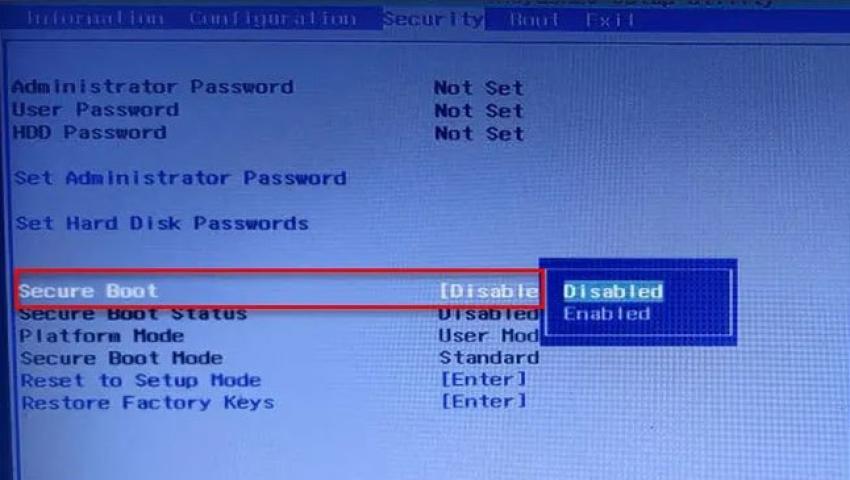
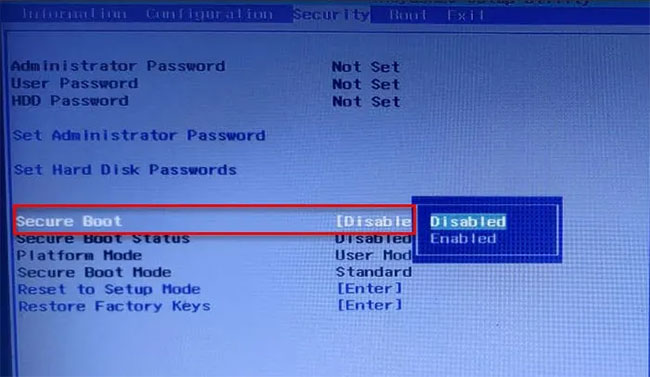
Secure Boot và Legacy Support là hai trong số những thủ phạm chính trong việc thay đổi thứ tự boot hệ thống. Do đó, vô hiệu hóa chúng sẽ khắc phục được sự cố. Bạn có thể làm theo các bước đã cho để vô hiệu hóa Secure Boot và Legacy Support.
B1: Khởi động vào BIOS của máy tính.
B2: Chuyển đến tab Security bằng các phím mũi tên.
B3: Bây giờ, hãy vào Secure Boot và vô hiệu hóa nó.
B4: Sau đó, chọn Legacy Support và vô hiệu hóa nó.
B5: Cuối cùng, lưu cài đặt và thoát khỏi BIOS.
Khi khởi động lại máy tính, bạn có thể thấy thông báo cho biết thứ tự boot đã được thay đổi và yêu cầu bạn nhập số được hiển thị.
Nếu không nhìn thấy bất cứ điều gì, chỉ cần tiếp tục với quá trình boot thông thường. Nhưng nếu thấy thông báo, sau đây là những gì bạn cần làm:
B1: Nhập các số này và nhấn Enter. (Lưu ý: Bạn sẽ không thể nhìn thấy số đã nhập).
B2: Bây giờ, tắt máy tính từ nút nguồn.
B3: Vào BIOS, chuyển đến tab Boot và chọn Boot from Hard Drive (một số cài đặt có thể khác nhau tùy thuộc vào OEM).
Cuối cùng, khởi động lại máy tính và kiểm tra xem sự cố đã được khắc phục chưa.
- Cách khắc phục mã lỗi 0x8007139f trên Windows 10/11
2. Vô hiệu hóa Boot to LAN
Vô hiệu hóa Boot to LAN
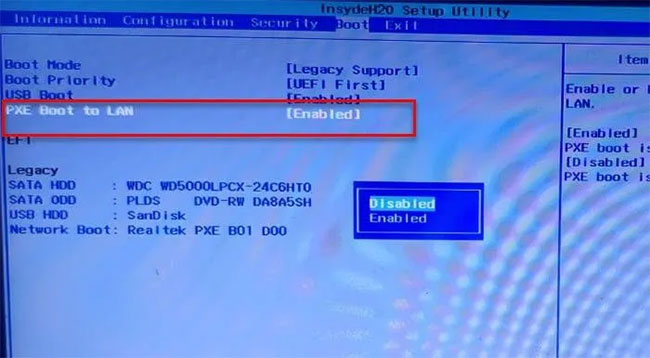
Một điều khác bạn có thể làm để sửa lỗi là vô hiệu hóa Boot to LAN. Hệ thống của bạn có thể có một tên khác, tùy thuộc vào thương hiệu laptop. Tuy nhiên, quy trình thường giống nhau.
Vì vậy, hãy làm theo các bước đã cho để tắt tùy chọn Boot to LAN.
B1: Khởi động vào BIOS.
B2: Chuyển đến tab Boot.
B3: Tắt tùy chọn PXE Boot to LAN.
B4: Lưu và thoát.
Khởi động lại máy tính và kiểm tra xem sự cố đã được khắc phục chưa.
Chúc bạn thực hiện thành công!
Phạm Thanh Long
Pho Tue SoftWare Solutions JSC là Nhà Cung cấp dịch Trung Tâm Dữ Liệu, Điện Toán Đám Mây Và Phát Triển Phần Mềm Hàng Đầu Việt Nam. Hệ Thống Data Center Đáp Ứng Mọi Nhu Cầu Với Kết Nối Internet Nhanh, Băng Thông Lớn, Uptime Lên Đến 99,99% Theo Tiêu Chuẩn TIER III-TIA 942.
Leave a comment
Your email address will not be published. Required fields are marked *